Information Technology
The internet is a natural lifestyle most of earth’s population has adhered to. As such, most terms or concepts are often overlooked, despite generally knowing its purpose. Here are, just a few, of these overlooked concepts explained.

Group Members: Angel DeVarel, Cleana Brummel, Darsh Persaud, Jaaaya Shiwraj, Imani Daniels, Jasmine Simpson and Shenelle Bhagoo
World Wide Web
The World Wide Web — also known as the web, WWW or W3 — refers to all the public websites or pages that users can access on their local computers and other devices through the internet. These pages and documents are interconnected by means of hyperlinks that users click on for information. This information can be in different formats, including text, images, audio and video.
Both the internet and the web operate within a client-server model. A server is a program that accepts requests from other computers, known as clients, on the network to store and transmit documents. Clients request documents from a server when a user asks for them and then displays them on the user’s screen.
The web is often confused with the internet even though they’re different. While the two are intricately connected, the web is just one of many applications built on top of the internet, a vast, global network of multiple smaller networks. The internet incorporates supporting infrastructure and other technologies that connect networks, websites and users to each other. In contrast, the web is a communications model or platform that enables the retrieval or exchange of information over the internet through HTTP. Through the WWW, users can access web pages over the internet by following a series of HTTP links. To retrieve and view these pages, users need to use a browser installed on the computer, such as Microsoft Edge, Google Chrome or Mozilla Firefox.
Hypertext Markup Language (html)
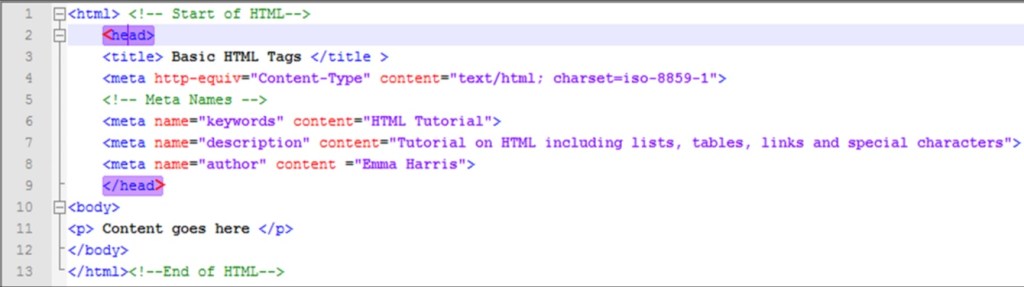
HyperText Markup Language, or HTML is a common formatting system used to create web pages or presenting content acquired via the Internet. Each retrieval unit is referred to as a Web page (from the World Wide Web), and such pages usually contain hypertext links that enable the retrieval of related sites. Using HTML components, such as tags and attributes enables the development and structuring of sections, paragraphs, and links.
Hypertext Transfer Protocol (http)
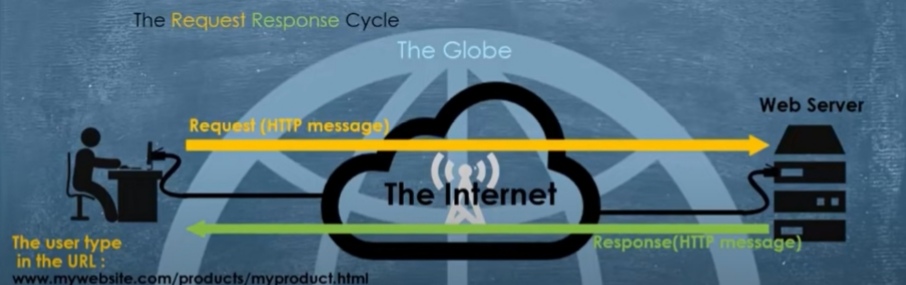
The collection of guidelines known as HTTP governs the transmission of files over the internet. A user starts using HTTP as soon as they open their web browser. The first text-based, interactive web browser, the original World Wide Web, was made possible by the invention of HTTP and HTML. The TCP/IP protocol family, which serves as the internet’s building block, is built upon the application protocol HTTP.
How does it work?
The HTTP protocol is used to exchange resources over the internet between client devices and servers. When a user visits a website, their computer sends a request to the server hosting that address. Requests and responses share sub-documents, which are assembled by a client web browser to display the entire file.
Internet Protocol Address (IP)
A device on the internet or a local network can be identified by its IP address, which is a unique address. IP addresses, which carry location information and make devices reachable for communication, are essentially the identifier that permits information to be sent and received between devices on a network. There must be a means for computers, routers, and webpages to be distinguished on the internet. A method for achieving this is provided by IP addresses, which are crucial to the operation of the internet. In some circumstances, it can also be used to determine a user’s precise location.
How to find your IP address?
The easiest way is just to type “what is my IP address” into a search engine. Protecting your online identity and personal information can be done by hiding your IP address and making use of a virtual private network (VPN)
Example of an IP address
IP addresses are a series of numbers (indicated as a set of 4 numbers) that are separated by periods. Each set of numbers can range from 0 to 255. An example of an IP is 0.221.17.155.
Types of IP addresses
There are 4 types of IP addresses:
•Private- Every device has its own IP address.
•Public- the main address for your entire network is a public IP address and it can come in two forms dynamic and static.
•Dynamic- Dynamic IP addresses change on a regular and automatic basis.
•Static- IP addresses remain constant.
Domain Name
A domain name is a string that identifies a realm of administrative autonomy, authority of control within the Internet. They are used in various networking contexts and for application specific naming and addressing purposes. The domain name is what comes after “@” in an email address or after “www.” after a website.
Uniform Resource Locator (URL)
URL stands for Uniform Resource Locator. A URL is nothing more than the address of a given unique resource on the Web. In theory, each valid URL points to a unique resource. Such resources can be an HTML page, a CSS document, an image, etc. In practice, there are some exceptions, the most common being a URL pointing to a resource that no longer exists or that has moved. As the resource represented by the URL and the URL itself are handled by the Web server, it is up to the owner of the web server to carefully manage that resource and its associated URL.

You might think of a URL like a regular postal mail address: the scheme represents the postal service you want to use, the domain name is the city or town, and the port is like the zip code; the path represents the building where your mail should be delivered; the parameters represent extra information such as the number of the apartment in the building; and, finally, the anchor represents the actual person to whom you’ve addressed your mail.
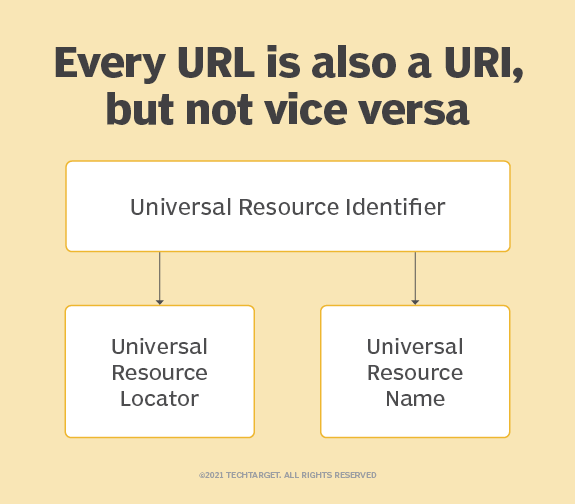
URI contains both URL and URN to identify the name and location or both of a resource; in contrast, URL is a subset of URI and only identifies the location of the resource. The example of URI is urn:isbn:0-476-27557-4, whereas the example of URL, is https://google.com.
Website
A website is a collection of publicly accessible webpages that all cover a similar theme or topic and share a single domain name (the website address, e.g. “google.com”). They may be created and maintained by individuals, businesses, or organisations for various purposes.
A collection of web pages belonging to a URL is called a website. For example, http://www.techtarget.com is a website, while https://www.techtarget.com/whatis/definition/World-Wide-Web is a web page.
Webpage
A web page is a simple document displayable by a browser. Such documents are written in the HTML language (which we look into in more detail in other articles). A web page can embed a variety of different types of resources such as:
-style information — controlling a page’s look-and-feel
-scripts — which add interactivity to the page
-media — images, sounds, and videos.
Home Page
A home page is a web page that you select to load first when you connect to the internet on your device. The root directory of the website contains the home pages. Many home pages serve as a site’s virtual directory by offering top-level menus that allow users to explore the site’s many sections in more detail. For instance, a typical website features a homepage with menu categories like “about,” “contact,” “products,” “services,” “press,” or “news.”
Weblog (Blog)
A blog (shortened version of ‘web log’) is an online journal or website used to provide regularly updated content on a specific topic/subject such as food, fashion, art, etc, often in an informal or conversational style. They may be run by an individual, a group, or by a corporation and are presented in reverse chronological order (most recent posts shown first). Blogs were mainly used for individual personal use, but now are often used by businesses as well.
What differentiates blogs from websites?
Blogs need frequent updates. Good examples of this include a food blog sharing meal recipes or a company writing about their industry news.
Blogs also promote reader engagement. Readers have a chance to comment and voice their different concerns and thoughts to the community. Blog owners update their site with new blog posts on a regular basis.
Web browser
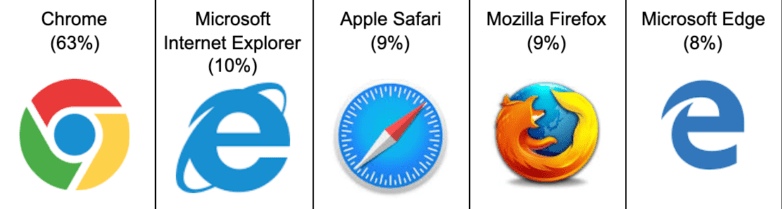
A web browser, or browser for short, is a software application that allows users to access information on the world wide web. When a user requests information, the web browser fetches the data from a web server and displays the information through a webpage.
Search Engine
A search engine is a computer program created to carry out database searches on files by using spiders or bots that gather and arrange content in response to user queries. It is used for searching for information, downloading, and finding images and files.
“Crawlers” or “Spiders” are bots or software designed by search engines to gather information from billions of websites.
Examples of Search Engines are:
•Google, which is the most popular search engine in the world.
•Bing, Owned and operated by Microsoft
•Baidu, which is China’s most popular search engine.

Web Server
A web server is a computer hosting one or more websites. “Hosting” means that all the web pages and their supporting files are available on that computer. The web server will send any web page from the website it is hosting to any user’s browser, per user request.
Don’t confuse websites and web servers. For example, if you hear someone say, “My website is not responding”, it actually means that the web server is not responding and therefore the website is not available. More importantly, since a web server can host multiple websites, the term web server is never used to designate a website, as it could cause great confusion. In our previous example, if we said, “My web server is not responding”, it means that multiple websites on that web server are not available.
Internet Service Provider (ISP)
An ISP (internet service provider) is a company that provides individuals and organizations access to the internet and other related services.
Your ISP makes the Internet a possibility. In other words, you can have a shiny computer with a built-in modem and could have a router for networking, but without a subscription with an ISP, you won’t have a connection to the Internet.
For the typical homeowner or apartment dweller, the ISP is usually a “cable company” that, in addition, or offering a TV subscription, also offers an Internet subscription. You don’t get both for the price of one, however. You can get just cable TV or just high-speed Internet, or both.
An ISP is your gateway to the Internet and everything else you can do online. The second your connection is activated and set up, you’ll be able to send emails, go shopping, do research, and more. The ISP is the link or conduit between your computer and all the other “servers” on the Internet. You may feel like you’re talking to your mom directly through email, but in reality, it’s more “indirectly.” Your email goes from your computer to the ISP computers/servers, where it’s sent along to its destination through other servers on the network.
File Transfer Protocol (FTP)
The process of transferring files between devices via a network is referred to as file transfer protocol (FTP). When one party permits another to send or receive files via the Internet, the operation is successful. The cloud, which is often a safe area that is held remotely, is now frequently used to store files. It was first utilized as a mechanism for users to communicate and share information between two physical machines.The end user’s machine is commonly referred to as the local host in an FTP transaction. The remote host, which is typically a server, is the second machine in an FTP connection. To transmit data with FTP, both computers must be networked together and correctly configured. For clients to access these services, FTP software must be installed and servers must be configured to run FTP services.
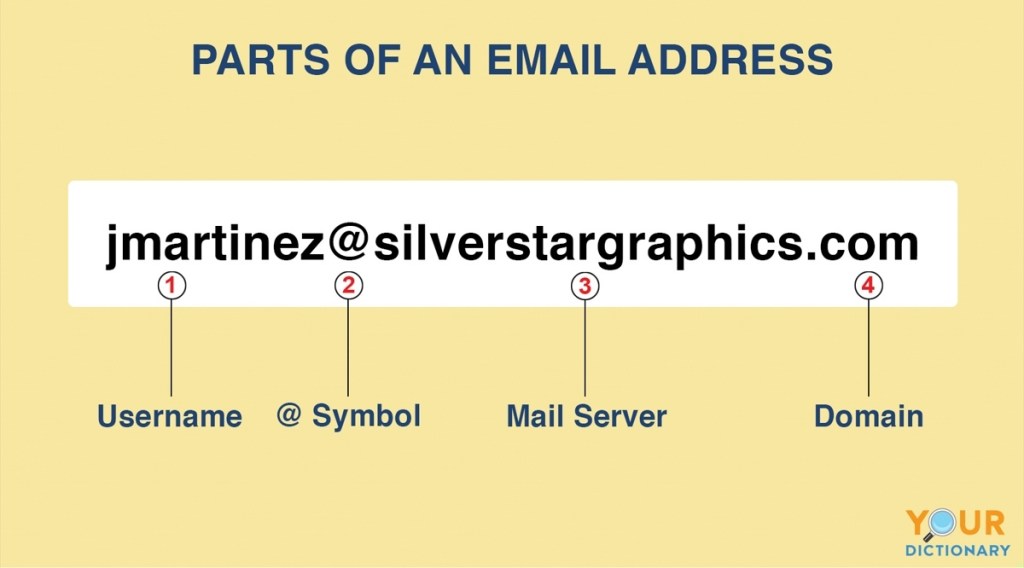
Electronic mail, commonly shortened to “email,” is a communication method that uses electronic devices to deliver messages across computer networks. “Email” refers to both the delivery system and individual messages that are sent and received.
Email has existed in some form since the 1970s, when programmer Ray Tomlinson created a way to transmit messages between computer systems on the Advanced Research Projects Agency Network (ARPANET). Modern forms of email became available for widespread public use with the development of email client software (e.g. Outlook) and web browsers, the latter of which enables users to send and receive messages over the Internet using web-based email clients (e.g. Gmail).
Today, email is one of the most popular methods of digital communication. Its prevalence and security vulnerabilities also make it an appealing vehicle for cyber attacks like phishing, domain spoofing, and business email compromise (BEC).
How does email work?
Email messages are sent from software programs and web browsers, collectively referred to as email ‘clients.’ Individual messages are routed through multiple servers before they reach the recipient’s email server, similar to the way a traditional letter might travel through several post offices before it reaches its recipient’s mailbox.
To continue the postal system analogy, imagine Alice writes a thank-you note to Bob. She hands the letter to the mail carrier (MTA), who brings it to the post office to be sorted. At the post office, a processing clerk (SMTP) verifies the address written on the envelope. If the address appears to be written correctly and corresponds to a location that can receive mail (MX server), another mail carrier delivers the letter to Bob’s mailbox. After picking up the mail, Bob might keep the note in his desk drawer, where he can only access it at that location (POP) or put it in his pocket to read at any location (IMAP).
Conversation Threading
A running commentary of text messages pertaining to one topic or question. Message threads are used in all forms of user discussions on the Internet, including Usenet newsgroups, Web-based forums, blogs, chat rooms, groupware and email.
The “thread” refers to the collection of messages organized by the software. The messages are displayed in “flat” chronological order by date of posting or in “question-answer” order.
They appear within a group, private message, channel, in chat rooms, emails, and even the comment section of blogs.
Message threads in your chat apps keep discussions organized. When you begin a thread, you can ask a question, respond to a query, or give feedback.
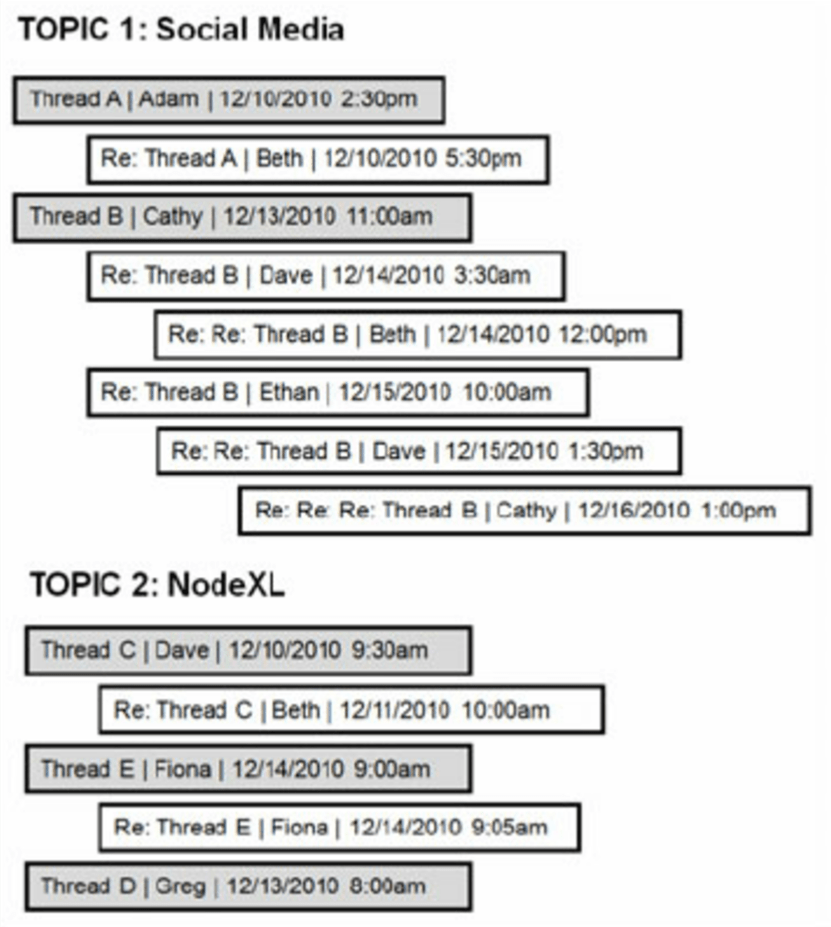
Modern email clients then can use the unique message identifiers found in the RFC 822 Message-ID, In-Reply-To: and References: fields of all received email headers to locate the parent and root message in the hierarchy, reconstruct the chain of reply-to actions that created them, and display them as a discussion tree. The purpose of the References: field is to enable reconstruction of the discussion tree even if some replies in it are missing.
Hyperlink
A hyperlink, also referred to as a link or web link, is an icon, graphic, or text that links to another file or object. The World Wide Web is comprised of hyperlinks linking trillions of pages and files to one another.
What happens when you click on a hyperlink?
When you click on a hyperlink you will leave the webpage that you were viewing and open another webpage
On a computer you can identify a hyperlink even if it’s not underlined by hovering your mouse pointer over the text. A browser changes the pointer from an arrow to a finger to indicate it can be opened. Also, at the bottom of the window the URL of the link should appear to help you identify where the link points.
A keyboard can also perform the same action as a click by pressing either the spacebar or the Enter on the keyboard. For example, you can press the Tab repeatedly to navigate through each of the links on this page. When you get to a link you want to “click” and visit, you can press the Enter key to follow that link.
Why are some Hyperlinks different colours?
Many websites change the colours of the links to let the user know what websites they have already visited. Usually, if you’ve visited a website already the link will be purple but when you haven’t visited a website the link is blue.
Bandwidth
Bandwidth is often mistaken for internet speed when it’s actually the volume of information that can be sent over a connection in a measured amount of time – calculated in megabits per second (Mbps).
Bandwidth is how much Information you receive every second, while speed is how fast that information is received or downloaded. When compared to filling a bathtub, if the bathtub faucet has a wide opening, more water can flow at a faster rate than if the pipe was narrower. Think of the water as the bandwidth and the rate at which the water flows as the speed
Internet Speed
Internet speed refers to how much data and information can be transferred over the web on a single connection at any given time.
Your internet speed is based on the amount of time your internet connection can download and upload data (bits). This speed is measured in megabits per second (Mbps) and gigabits per second (Gbps)—one Mbps is 1,000,000 bits being transferred per second, and one Gbps is 1,000,000,000 bits being transferred per second. The higher the number of Mbps or Gbps you see, the faster the internet speed. Just remember that your chosen speed will depend on your specific internet needs.
It is more common to see internet speeds measured in Mbps because many do not require the extreme speeds of Gigabit internet, but this is a good choice for busy smart households with gamers and work-from-home residents.
Upload and Download
Uploading is the process of putting web pages, images and files onto a web sever.
Examples of uploading include sending email, posting photos on a sociamedia site and using your webcam.
Downloading is the process of getting web pages, images and files from a web server.
Examples: downloading an app or a photo.
References
Vailshery, L. S. (2022, August 5). U.S. Desktop Internet Browser Market Share 2022. Statista. Retrieved September 27, 2022, from https://www.statista.com/statistics/272697/market-share-desktop-internet-browser-usa/
HTTP protocol – definition & how it works – extrahop. ExtraHop. (n.d.). Retrieved September 27, 2022, from https://www.extrahop.com/resources/protocols/http/
What is HTTP? | cloudflare. (n.d.). Retrieved September 28, 2022, from https://www.cloudflare.com/learning/ddos/glossary/hypertext-transfer-protocol-http/
YouTube. (2016, May 5). The HTTP and the web | HTTP explained | request-response cycle. YouTube. Retrieved September 27, 2022, from https://www.youtube.com/watch?v=eesqK59rhGA&ab_channel=TheTechCave
Admin. (2022, February 1). What is a web browser?: Its functions, Types & Questions. BYJUS. Retrieved September 27, 2022, from https://byjus.com/govt-exams/web-browser/
AH Ari Howard Sep 7, & Howard, A. (2022, September 15). Internet speeds explained: How to pick The speed you need. Allconnect. Retrieved September 18, 2022, from https://www.allconnect.com/blog/consumers-guide-to-internet-speed
Chai, W., & Ferguson, K. (2021, March 22). What is HTTP and how does it work? hypertext transfer protocol definition. WhatIs.com. Retrieved September 27, 2022, from https://www.techtarget.com/whatis/definition/HTTP-Hypertext-Transfer-Protocol
Chai, W., & Ferguson, K. (2021, March 22). What is HTTP and how does it work? hypertext transfer protocol definition. WhatIs.com. Retrieved September 27, 2022, from https://www.techtarget.com/whatis/definition/HTTP-Hypertext-Transfer-Protocol
Dictionary.com. (n.d.). N definition & meaning. Dictionary.com. Retrieved September 27, 2022, from https://www.dictionary.com/browse/n
Encyclopædia Britannica, inc. (n.d.). HTML. Encyclopædia Britannica. Retrieved September 27, 2022, from https://www.britannica.com/technology/HTML
Gartner_Inc. (n.d.). Definition of website – gartner information technology glossary. Gartner. Retrieved September 27, 2022, from https://www.gartner.com/en/information-technology/glossary/website
Gillis, A. S. (2022, February 9). What is an internet service provider (ISP)? WhatIs.com. Retrieved September 18, 2022, from https://www.techtarget.com/whatis/definition/ISP-Internet-service-provider
Gillis, A. S. (2022, February 9). What is an internet service provider (ISP)? WhatIs.com. Retrieved September 27, 2022, from https://www.techtarget.com/whatis/definition/ISP-Internet-service-provider
Home Page. Cambridge Dictionary. (n.d.). Retrieved September 27, 2022, from https://dictionary.cambridge.org/dictionary/english/home-page
HTTP protocol – definition & how it works – extrahop. ExtraHop. (n.d.). Retrieved September 27, 2022, from https://www.extrahop.com/resources/protocols/http/
Kaspersky. (2022, April 18). What is an IP address – definition and explanation. http://www.kaspersky.com. Retrieved September 27, 2022, from https://www.kaspersky.com/resource-center/definitions/what-is-an-ip-address
Kerner, S. M., & Burke, J. (2021, May 6). What is FTP? file transfer protocol explained. SearchNetworking. Retrieved September 27, 2022, from https://www.techtarget.com/searchnetworking/definition/File-Transfer-Protocol-FTP
Kuldeep RanaKuldeep is the founder and lead author of ArtOfTesting. He is skilled in test automation. (2022, August 20). What is a web browser? definition, features, and examples. ArtOfTesting. Retrieved September 27, 2022, from https://artoftesting.com/what-is-a-web-browser
M., M. (2022, September 26). What is a blog? definition, blog types, and benefits explained. Hostinger Tutorials. Retrieved September 27, 2022, from https://www.hostinger.com/tutorials/what-is-a-blog
Mitchell, C. (2022, August 29). IP address definition: How it works and examples. Investopedia. Retrieved September 27, 2022, from https://www.investopedia.com/terms/i/ip-address.asp
Mitchell, C. (2022, September 21). What is File Transfer Protocol (FTP) and what is it used for? Investopedia. Retrieved September 27, 2022, from https://www.investopedia.com/terms/f/ftp-file-transfer-protocol.asp
S., A. (2022, July 21). What is HTML? hypertext markup language basics explained. Hostinger Tutorials. Retrieved September 27, 2022, from https://www.hostinger.com/tutorials/what-is-html
Uri vs URL: Difference between URI and URL – javatpoint. http://www.javatpoint.com. (n.d.). Retrieved September 27, 2022, from https://www.javatpoint.com/uri-vs-url
Vailshery, L. S. (2022, August 5). U.S. Desktop Internet Browser Market Share 2022. Statista. Retrieved September 27, 2022, from https://www.statista.com/statistics/272697/market-share-desktop-internet-browser-usa/
What is a blog? – definition of blog, Blogging & Blogger. FirstSiteGuide. (2022, July 26). Retrieved September 27, 2022, from https://firstsiteguide.com/what-is-blog/
What is a domain name? – domain names – beginner’s guide. Website.com. (n.d.). Retrieved September 18, 2022, from https://www.website.com/beginnerguide/domainnames/8/1/What-is-a-domain-name?.ws&source=SC#:~:text=A%20domain%20name%20is%20your,are%20a%20series%20of%20number.
What is a home page? – definition from Techopedia. Techopedia.com. (n.d.). Retrieved September 27, 2022, from https://www.techopedia.com/definition/5172/home-page
What is bandwidth – definition, meaning & explanation. Verizon Fios. (n.d.). Retrieved September 18, 2022, from https://www.verizon.com/info/definitions/bandwidth/
What is homepage – definition, meaning and examples. Arimetrics. (2021, November 23). Retrieved September 27, 2022, from https://www.arimetrics.com/en/digital-glossary/homepage
What is HTTP? | cloudflare. (n.d.). Retrieved September 28, 2022, from https://www.cloudflare.com/learning/ddos/glossary/hypertext-transfer-protocol-http/
What is search engine – definition, meaning and examples. Arimetrics. (2022, September 26). Retrieved September 27, 2022, from https://www.arimetrics.com/en/digital-glossary/search-engine
YouTube. (2016, May 5). The HTTP and the web | HTTP explained | request-response cycle. YouTube. Retrieved September 27, 2022, from https://www.youtube.com/watch?v=eesqK59rhGA&ab_channel=TheTechCave
 ITechWizzez